Introduction
In the bustling world of e-commerce, capturing customer attention is just the first step. Converting that attention into loyal patronage often hinges on your ability to build a relationship beyond the initial sale. One of the most effective ways to do this is by growing your email list, and your WooCommerce checkout page offers a prime opportunity.
A well-optimised checkout opt-in field can transform one-time buyers into engaged subscribers, opening the door for future marketing campaigns and repeat purchases. However, simply adding a checkbox isn't enough. To achieve better conversion rates and maintain trust, you need a thoughtful strategy that balances user experience, clear communication, and compliance.
This article will guide you through best practices for customising your WooCommerce checkout field, offering actionable insights to help you capture more newsletter subscriptions WooCommerce stores need to thrive. We'll explore how to craft compelling messages, choose the right placement, ensure compliance, and leverage tools like WooCommerce Campaign Monitor Pro to streamline the entire process.
Why Your Checkout Opt-in Field Matters for Conversions
Your checkout page is a critical touchpoint. Customers are already committed to making a purchase, indicating a high level of interest in your brand. This makes it an ideal moment to invite them into your wider community through email. A strategically designed opt-in field can significantly impact your long-term business success.
Building Your Email List
An email list is one of your most valuable marketing assets. Unlike social media algorithms that can change without warning, your email list provides a direct line of communication to your audience. Each new newsletter subscription WooCommerce stores gain at checkout adds a potential long-term customer to this asset.
These subscribers are often highly qualified leads because they've already demonstrated purchasing intent. They've trusted you with their payment information, making them more likely to trust you with their email address for future communications. Collecting these emails directly at the point of sale is far more efficient than trying to re-engage them later through other channels.
Nurturing Customer Relationships
Email marketing allows you to nurture relationships with your customers by providing value beyond transactions. You can share exclusive content, announce new products, offer special discounts, and provide helpful tips related to their purchases. This consistent engagement builds loyalty and keeps your brand top-of-mind.
For example, the profile data collected during subscription can be used within Campaign Monitor to segment subscribers and send them relevant follow-up emails, like care instructions for a general product category or complementary product recommendations based on their customer profile. This personalised approach makes customers feel valued and understood, fostering a deeper connection with your store.
Driving Repeat Business
The ultimate goal of email list building is often to drive repeat business. Subscribers who receive regular, valuable communications are far more likely to return to your store for future purchases. They're already familiar with your brand and have a history with you, reducing the friction of making another purchase.
By effectively customising your checkout opt-in, you create a pathway to ongoing communication that translates directly into increased customer lifetime value. Imagine a customer who opts in and whose profile data is then used within Campaign Monitor to send a birthday discount or a flash sale notification. Campaign Monitor's powerful segmentation and automation capabilities, fueled by this synced profile data, make these targeted emails powerful conversion tools.
Key Elements of an Effective Checkout Opt-in Field
Customising your WooCommerce checkout field for newsletter subscriptions goes beyond mere aesthetics. It involves thoughtful consideration of several key elements to maximise opt-in rates while respecting customer privacy.
Clear and Compelling Label Text
The text accompanying your opt-in checkbox is perhaps the most critical element. It needs to be clear, concise, and communicate the value of subscribing. Ambiguous or overly promotional language can deter potential subscribers.
Actionable Tip: Craft Benefit-Oriented Copy
Instead of generic phrases like "Subscribe to our newsletter," focus on the benefits customers will receive. What's in it for them? Will they get exclusive discounts, early access to sales, helpful tips, or news about new products?
- Good Example: "Yes, I want to receive exclusive discounts and product updates directly to my inbox!"
- Better Example: "Sign me up for our VIP list to get 10% off your next order and early access to new arrivals!"
- Avoid: "Subscribe for marketing updates." (Too vague and unappealing.)
The WooCommerce Campaign Monitor Pro plugin allows you to fully customise the label text for your opt-in checkbox, giving you the flexibility to test different messages and find what resonates best with your audience.
Strategic Placement on the Checkout Page
The location of your checkout opt-in field can significantly influence its visibility and conversion rate. It needs to be prominent enough to be noticed but not intrusive enough to disrupt the checkout flow.
Actionable Tip: Experiment with Position
Consider placing the opt-in field near other non-essential but important fields, such as "Order Notes" or just before the "Place Order" button. Placing it too high might distract from essential billing information, while placing it too low might mean some customers miss it.
- Common & Effective Placements:
- After billing details but before shipping details.
- Before the "Place Order" button (often a strong performer).
- Within the "Order Notes" or "Additional Information" section.
WooCommerce Campaign Monitor Pro offers multiple configurable positions for the woocommerce checkout field, allowing you to easily test different locations without needing to write custom code. This flexibility is invaluable for optimising your opt-in placement for your specific store layout and customer journey.
Default State (Checked vs. Unchecked)
The default state of your opt-in checkbox – whether it's pre-ticked or unchecked – has a massive impact on both your subscription rate and your compliance with privacy regulations like GDPR.
Actionable Tip: Prioritise Compliance and Trust
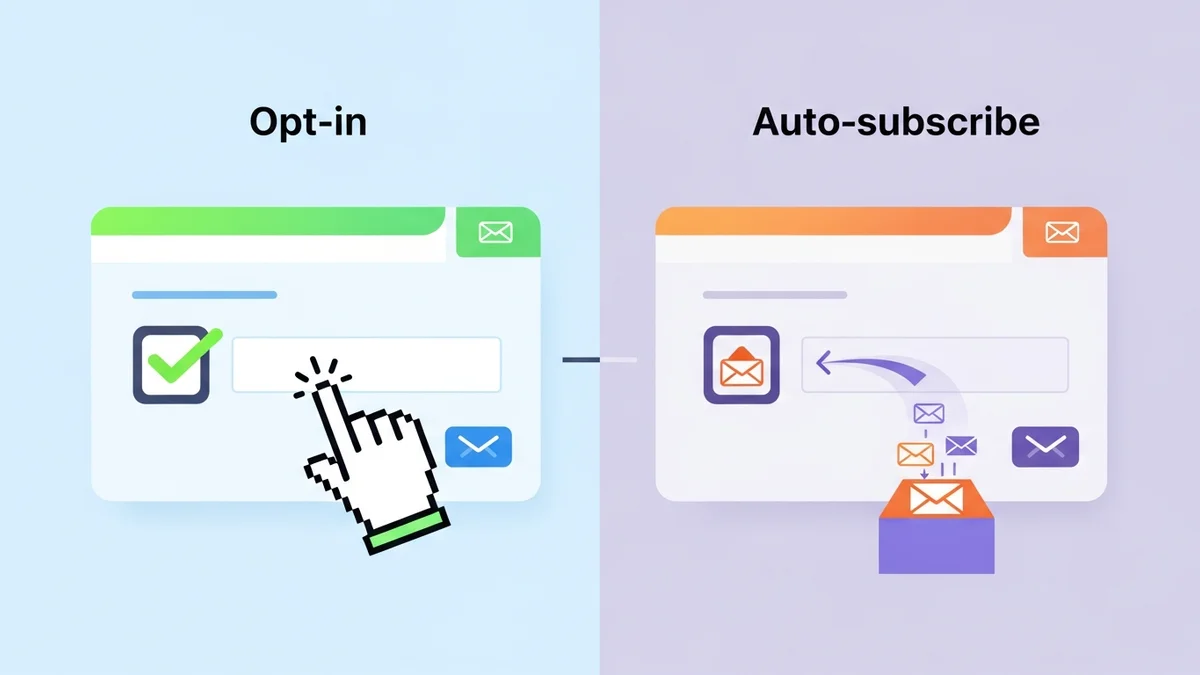
For most regions, especially those under GDPR (General Data Protection Regulation) or similar privacy laws, the opt-in checkbox must be unchecked by default. This means customers must actively choose to subscribe, providing explicit consent.
- Unchecked by Default: This is the recommended and legally compliant approach. It shows respect for customer privacy and builds trust. While your immediate opt-in rate might be slightly lower than with a pre-ticked box, the quality of your subscribers will be higher, as they genuinely want to hear from you.
- Pre-checked by Default (Avoid): This practice is generally non-compliant with GDPR and can erode customer trust. It relies on "passive consent," which is often not considered valid. Even if not legally mandated in your region, it's a poor user experience.
The WooCommerce Campaign Monitor Pro plugin is designed with GDPR compliance in mind, ensuring the opt-in checkbox is unchecked by default. This protects your business and fosters a relationship of trust with your customers from the outset.
Transparency and Trust
Beyond the checkbox itself, providing transparency about your privacy practices is crucial. Customers are more likely to opt-in if they feel confident their data will be handled responsibly.
Actionable Tip: Link to Your Privacy Policy
Always include a clear, accessible link to your store's privacy policy near the opt-in checkbox. This gives customers the option to review how their data will be used before they commit to subscribing.
- Example: "Yes, I want to receive exclusive discounts and product updates! Read our Privacy Policy."
This simple addition reinforces trust and demonstrates your commitment to data protection, encouraging more legitimate sign-ups for your newsletter subscription WooCommerce list.
Leveraging Customer Data for Better Personalisation
Simply collecting email addresses is a good start, but to truly maximise the value of your Campaign Monitor signup efforts, you need to collect richer customer profile data. This data allows for powerful segmentation and personalisation *within Campaign Monitor*, making your email campaigns far more effective.
Beyond Just Email Addresses
Imagine being able to send an email campaign specifically to customers in a particular city, or those whose profile indicates a preference. This level of targeting is only possible when you collect and utilise additional customer profile information.
WooCommerce stores gather a wealth of customer profile data during the checkout process – names, email addresses, phone numbers, and billing address details. Tapping into this information for your email marketing can transform generic newsletters into highly relevant communications.
Mapping WooCommerce Fields to Campaign Monitor
This is where a robust integration solution truly shines. Instead of just sending an email address, you can "map" fields from your WooCommerce store directly to custom fields in your Campaign Monitor list. Crucially, these custom fields must already exist in your Campaign Monitor account before you can map them from WooCommerce.
- First Name & Last Name: Personalise greetings (e.g., "Hi [First Name],").
- Billing Country/City: Segment by geography for location-specific promotions or shipping updates.
- Phone Number: While not for email, it can be useful for other marketing channels if explicitly opted in.
The WooCommerce Campaign Monitor Pro plugin excels at this. It allows you to easily map standard WooCommerce customer profile fields (like first name, last name, billing country, city, and phone number) to existing custom fields in your Campaign Monitor account. It's important to note that these custom fields must be set up within Campaign Monitor first. This automatic sync of customer profile data ensures that your Campaign Monitor lists are always enriched with valuable customer details, setting the stage for highly targeted and effective campaigns.
Actionable Tip: Collect Relevant Information
Before mapping, decide what data points are genuinely useful for your marketing strategy. Don't collect data just for the sake of it. Focus on information that will enable meaningful segmentation and personalisation in Campaign Monitor.
- Example: If you sell apparel, knowing a customer's billing country allows you to use Campaign Monitor to send emails about local events or shipping promotions. If you have different product lines, using Campaign Monitor's segmentation tools with the synced customer profile data can help you tailor future product announcements to relevant groups.
GDPR and Privacy Compliance: Building Trust with Your Audience
In today's digital landscape, privacy is paramount. Ignoring regulations like GDPR or CCPA not only carries legal risks but also erodes customer trust. Ensuring your checkout opt-in process is compliant is non-negotiable for any serious e-commerce business.
Understanding Consent
The core of most privacy regulations regarding email marketing is "explicit consent." This means that customers must knowingly and freely give permission for you to send them marketing communications. This consent must be:
- Freely Given: Not forced or a condition for purchase.
- Specific: Clearly stating what they're signing up for (e.g., "newsletter," "marketing emails").
- Informed: With access to your privacy policy.
- Unambiguous: A clear affirmative action, like checking a box.
As discussed, a pre-checked opt-in box does not meet these criteria, as it relies on inaction rather than affirmative action.
Best Practices for Compliance
Adhering to privacy best practices goes beyond just ticking a legal box; it's about building a reputation as a trustworthy brand. Here are some key points:
- Unchecked by Default: This is the fundamental rule for opt-in checkboxes.
- Clear Language: Avoid legal jargon. Make it easy for customers to understand what they're consenting to.
- Link to Privacy Policy: Always provide easy access to your full privacy policy.
- Easy Unsubscribe: Ensure every email you send has a clear and easy-to-use unsubscribe link. (This is handled by Campaign Monitor itself.)
- Record Keeping: Be able to demonstrate when and how consent was given. (The plugin logs subscriber activity.)
Actionable Tip: Make Consent Explicit
Design your WooCommerce checkout field to leave no room for doubt about a customer's intent to subscribe. The WooCommerce Campaign Monitor Pro plugin facilitates this by ensuring the opt-in checkbox is unchecked by default, allowing customers to actively choose to subscribe, thus aligning with GDPR and similar regulations.
Technical Implementation: Making it Happen in WooCommerce
Implementing a custom checkout opt-in field in WooCommerce can range from simple to complex, depending on your desired functionality and technical expertise. While manual coding is an option, using a dedicated plugin offers significant advantages for most store owners.
Manual Coding Challenges
Manually adding a newsletter subscription checkbox to your WooCommerce checkout requires familiarity with WordPress hooks, filters, and potentially PHP coding. You'd need to:
- Add the field to the checkout page template.
- Validate the field input.
- Programmatically send the email address and customer profile data to your email marketing service (like Campaign Monitor) via its API.
- Handle errors, consent tracking, and ensure GDPR compliance.
This approach is time-consuming, prone to errors, and requires ongoing maintenance, especially with WooCommerce and WordPress updates. It's generally not recommended for non-technical store owners.
Using a Dedicated Plugin: WooCommerce Campaign Monitor Pro
This is where a specialised plugin like WooCommerce Campaign Monitor Pro becomes invaluable. It automates the complex technical aspects, allowing you to focus on strategy and customer engagement.
Simplified Setup
Connecting your WooCommerce store to Campaign Monitor is straightforward. You simply enter your Campaign Monitor API key, select the list you want new subscribers to join (this list must already exist in your Campaign Monitor account), and you're ready to configure your checkout opt-in.
Automated Syncing
Once activated, the plugin automatically syncs customer profile data for opted-in customers from your WooCommerce checkout directly to your chosen Campaign Monitor list. Campaign Monitor then handles all email delivery, segmentation, and automation based on this provided subscriber data. There's no manual exporting or importing required, saving you significant time and reducing the chance of data entry errors.
Configurable Options
WooCommerce Campaign Monitor Pro offers extensive customisation for your opt-in field, aligning with the best practices discussed earlier:
- Custom Label Text: Easily change the checkbox text to be compelling and benefit-oriented.
- Multiple Positions: Choose from seven different positions on the checkout page to find the optimal placement for your woocommerce checkout field.
- Default State Control: The checkbox is unchecked by default for GDPR compliance, but you also have an "auto-subscribe" mode for specific, implicit consent scenarios (though explicit opt-in is generally recommended).
Rich Customer Data for Better Segmentation
Beyond just email addresses, the plugin allows comprehensive field mapping of customer profile data. You can map standard WooCommerce customer fields like first name, last name, billing country, city, and phone number to corresponding custom fields in Campaign Monitor. Remember, these custom fields must be created in Campaign Monitor before you can map them. This rich customer profile data is crucial for creating highly segmented and personalised email campaigns *within Campaign Monitor*.
Bulk Import Capabilities
For existing stores or those migrating to Campaign Monitor, the plugin includes a powerful bulk import feature. You can import past WooCommerce customers' profile data to your Campaign Monitor list, filtering by date range and even detecting previous opt-in choices from other newsletter plugins. This is perfect for ensuring your entire customer base's profile data is available for marketing, provided you have the necessary consent.
WooCommerce Campaign Monitor Pro also handles large imports gracefully using background processing, so your site performance isn't affected. It supports both classic and block-based WooCommerce checkout and is compatible with WooCommerce HPOS (High-Performance Order Storage), ensuring it works seamlessly with modern WooCommerce setups.
Testing and Optimisation: Fine-Tuning for Success
Once you've implemented your customised checkout opt-in field, your work isn't over. The key to truly boosting conversions is continuous testing and optimisation. What works for one store might not work for another, so it's vital to understand your own audience's behaviour.
A/B Testing Your Opt-in Field
A/B testing (or split testing) involves creating two versions of your opt-in field – a "control" (your current version) and a "variant" (a modified version) – and showing them to different segments of your audience. You then compare their performance to see which version yields a higher subscription rate.
- What to Test:
- Label Text: Different benefit-driven phrases.
- Placement: Try a different position on the checkout page.
- Emphasis: Test using bold text or italics on certain words.
- Privacy Policy Link Text: "Privacy Policy" vs. "How we use your data."
While WooCommerce doesn't have built-in A/B testing for checkout fields, you can use third-party tools or manually swap configurations (e.g., using the WooCommerce Campaign Monitor Pro's configurable options) and track results over specific periods.
Monitoring Conversion Rates
Regularly track the conversion rate of your newsletter subscription WooCommerce opt-in field. This metric will tell you how many of your checkout visitors are actually signing up for your list. Look for trends and correlate changes in your opt-in rate with any modifications you've made.
- Calculation: (Number of opt-ins / Number of completed checkouts) * 100
Your email marketing platform (Campaign Monitor) will also provide valuable insights into the engagement of these new subscribers. Are they opening your welcome emails? Clicking on links? This helps you gauge the quality of your opt-ins, not just the quantity.
Actionable Tip: Continuously Analyze and Adapt
Don't set and forget your opt-in field. The digital landscape, customer expectations, and even privacy regulations can evolve. Regularly review your data, test new ideas, and adapt your strategy to maintain optimal conversion rates and build a robust, engaged email list. Tools that offer flexibility, like WooCommerce Campaign Monitor Pro, make this iterative process much easier.
Advanced Strategies for Growing Your List
Once you've perfected your checkout opt-in field and the WooCommerce Campaign Monitor Pro plugin is syncing customer profile data, the real work of nurturing those new subscribers begins. Campaign Monitor's robust platform allows for powerful automation and segmentation, fueled by the synced profile data, that can significantly boost customer lifetime value.
Welcome Series Automation
A well-crafted welcome series is crucial for engaging new subscribers. Immediately after a customer opts in at checkout, completes their purchase, and their profile data is synced by the plugin, Campaign Monitor can then trigger a series of automated emails designed to introduce them to your brand, offer value, and
Related Articles
Continue your learning with these related resources:
- Mastering WooCommerce Campaign Monitor Pro: Your Ultimate Integration Guide for E-commerce Growth (Comprehensive Guide)
- How to Optimize WooCommerce Order Sync Timing for Campaign Monitor
- How to Set the Subscriber Name Format Sent from WooCommerce to Campaign Monitor
- How to Manually Sync a WooCommerce Order to Campaign Monitor from the Order Admin
- How to Choose the Right Campaign Monitor List for Your WooCommerce Store
- How to Bypass Campaign Monitor Double Opt-in for WooCommerce Checkout Subscribers