Introduction
For any WooCommerce store owner, building a robust email list is crucial for long-term success. Email marketing remains one of the most effective channels for engaging customers, driving repeat purchases, and announcing new products. While pop-ups and dedicated signup forms have their place, your checkout page offers a unique and highly effective opportunity to capture new subscribers: the checkout opt-in.
Customers on your checkout page are already demonstrating strong buying intent, making them highly qualified leads for your newsletter. However, simply adding a checkbox isn't enough. To truly maximise your newsletter subscription WooCommerce opt-in rates, you need a strategic approach to both the design and placement of your opt-in field. This article will guide you through expert recommendations and best practices to turn your checkout into a powerful subscriber magnet, all while maintaining a smooth user experience and ensuring GDPR compliance.
Understanding the Power of Checkout Opt-ins
Why Your Checkout Page is a Goldmine for Subscribers
Think about the customer journey: by the time someone reaches your WooCommerce checkout, they've already browsed your products, added items to their cart, and decided to make a purchase. They've invested time and shown interest, making them much more likely to be interested in ongoing communication from your brand.
This "hot audience" factor makes the checkout page an ideal spot to ask for a newsletter subscription WooCommerce. Unlike a generic pop-up that might interrupt browsing, a checkout opt-in feels like a natural part of the transaction. It's an opportunity to solidify a new customer relationship and turn a one-time buyer into a loyal, engaged subscriber.
The Balance: Growing Your List vs. User Experience
While the potential for subscriber growth is immense, it's vital to strike a balance. Your primary goal at checkout is to facilitate a seamless purchase. Any element that distracts, confuses, or creates friction can lead to abandoned carts. The checkout opt-in must be simple, clear, and non-intrusive.
The best strategies focus on integrating the opt-in naturally into the existing checkout flow. This means thoughtful wording, intuitive placement, and respecting user privacy. A well-implemented opt-in enhances the user experience by offering value, rather than detracting from it.
Key Design Strategies for Your WooCommerce Checkout Opt-in
The way your opt-in checkbox looks and reads significantly impacts whether a customer decides to subscribe. A poorly designed or confusing opt-in can be easily overlooked or ignored. Focus on clarity, compliance, and integration with your overall brand aesthetic.
Clear and Concise Label Text
The text accompanying your WooCommerce checkout field for the newsletter subscription is paramount. It needs to clearly communicate what the customer is signing up for and the value they will receive. Avoid jargon or vague promises.
- Be Specific: Instead of "Subscribe to our newsletter," try "Receive exclusive offers and updates directly to your inbox."
- Highlight Benefits: Mention what subscribers gain. Examples include "Be the first to know about new arrivals," "Get special discounts," or "Insider tips and product news."
- Keep it Short: Long, rambling text will be skipped. Aim for one clear, compelling sentence.
- Brand Voice: Align the tone with your brand's personality. If you're fun and quirky, let that shine through.
For example, "Yes, I'd like to receive exclusive deals and new product alerts!" is much more engaging than "Sign up for our newsletter."
Strategic Default State: Unchecked for Compliance
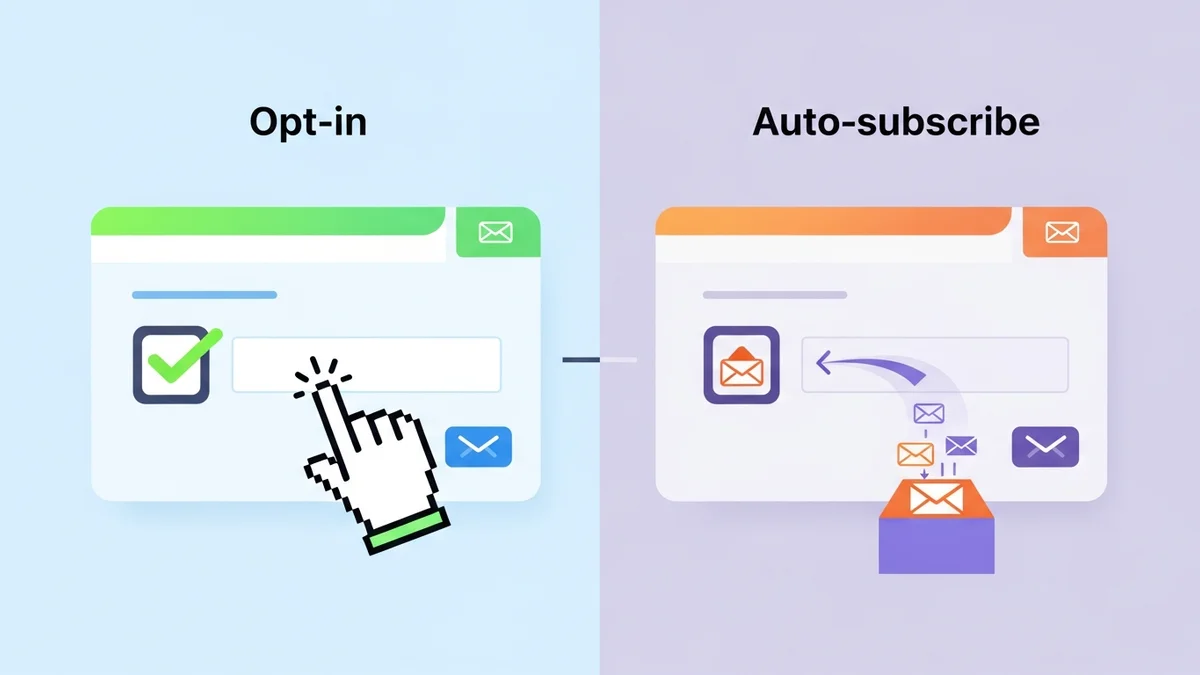
This is a critical point for both user experience and legal compliance, especially concerning GDPR. Your checkout opt-in checkbox should always be unchecked by default. Customers must actively choose to subscribe.
- GDPR Compliance: Pre-ticked boxes for marketing consent are generally non-compliant with strict privacy regulations like GDPR. Explicit consent requires an affirmative action from the user.
- Builds Trust: An unchecked box shows respect for your customer's privacy and choice. It avoids the feeling of being "tricked" into subscribing.
- Higher Quality Subscribers: When customers consciously opt-in, they are more engaged and less likely to mark your emails as spam, leading to better email deliverability and higher open rates.
Plugins like WooCommerce Campaign Monitor Pro are designed with this in mind, making the opt-in checkbox unchecked by default to help ensure your store's compliance.
Visual Appeal and Integration
The opt-in checkbox should blend seamlessly with your existing checkout design. It shouldn't look like an afterthought or a jarring addition.
- Consistent Styling: Use your brand's fonts, colours, and button styles. The checkbox itself and its label should match the overall aesthetic of your WooCommerce checkout page.
- Adequate Spacing: Don't cram the opt-in field between other elements. Give it enough breathing room so it's easy to spot and interact with.
- Readability: Ensure the font size and contrast make the label easy to read for all users, including those on mobile devices or with visual impairments.
A well-integrated opt-in feels like a natural part of the form, not an interruption.
Mobile Responsiveness is Non-Negotiable
A significant portion of online purchases now happen on mobile devices. Your checkout opt-in form must be perfectly responsive and easy to use on smartphones and tablets.
- Tap-Friendly Checkbox: Ensure the checkbox itself is large enough to be easily tapped with a finger.
- Legible Text: The label text should remain clear and readable without requiring zooming.
- No Overlapping Elements: Test that the opt-in field doesn't overlap with other checkout elements or get pushed off-screen on smaller displays.
A frustrating mobile experience at checkout can lead to abandoned carts and missed subscription opportunities.
Optimal Placement Strategies for Maximum Opt-in Rates
Where you place your WooCommerce checkout field for newsletter subscriptions can dramatically influence your opt-in rates. There isn't a single "perfect" spot for every store, as it often depends on your specific checkout layout and customer behaviour. However, there are best practices and common locations that tend to perform well.
The "Sweet Spot" Phenomenon
The "sweet spot" for a checkout opt-in is typically a location where the customer has completed most of the necessary information fields but hasn't yet committed to the final purchase. At this point, they've invested time and are ready to finalize, making them receptive to an optional value-add.
Placing it too early might mean they haven't fully committed to the purchase, while placing it too late (e.g., after they've clicked "Place Order") is usually too late to ask for consent. The goal is to catch them at the peak of their engagement.
Common Placement Options and Their Impact
WooCommerce checkout pages offer several logical positions for your newsletter opt-in. Many plugins, including WooCommerce Campaign Monitor Pro, provide flexible options for checkbox placement.
Before Payment Information
This is a very popular and often effective placement. Customers have usually entered their billing and shipping details, but haven't yet revealed sensitive payment information. Asking for a newsletter subscription WooCommerce here feels natural.
- Pros: Customers have completed most data entry and are mentally preparing for payment, making them receptive. It doesn't interrupt payment details.
- Cons: If placed too high, it might be seen before they've fully committed to the purchase.
- Example: Located just above the "Payment Method" section or below the shipping address fields.
After Order Review
Some stores find success placing the opt-in just before the final "Place Order" button, often within or just after the "Your order" summary section. Here, the customer has reviewed everything and is moments away from completing the transaction.
- Pros: High commitment level; customers have seen the full order and are ready to finalize.
- Cons: Could be perceived as "one more thing" right before the final step, potentially causing minor friction if not handled well.
- Example: Directly above the "Place Order" button, clearly separated from payment fields.
Near Contact Information
Placing the opt-in checkbox close to where customers enter their email address or phone number can also be effective. It logically groups communication-related fields together.
- Pros: Logical grouping of fields. Customers are already focussed on entering contact details.
- Cons: Might be too early in the process for some customers, as they haven't fully committed to the purchase yet.
- Example: Below the email address field in the billing details section.
Custom Placements with Plugins
Many advanced plugins, like WooCommerce Campaign Monitor Pro, offer specific control over where your opt-in checkbox appears. This allows you to experiment with various locations that best suit your unique checkout theme and user flow. Options might include:
- After billing details
- After shipping details
- Before order notes
- Before payment section
- After payment section
- Above "Place Order" button
- After "Place Order" button (though less recommended for explicit consent)
The flexibility to choose from multiple positions for your woocommerce checkout field is invaluable for optimizing your opt-in rates.
Testing and Iteration: Finding Your Best Placement
The ultimate strategy for optimal placement is A/B testing. What works best for one store might not work for another. Use tools to test different positions and track your opt-in rates. Look for:
- Higher Subscription Rates: Which placement leads to the most new newsletter signups?
- Consistent Conversion Rates: Ensure the new placement doesn't negatively impact your overall checkout conversion rate.
- User Feedback: Pay attention to any customer service inquiries or comments about the checkout process.
Don't be afraid to experiment. Start with a recommended spot, gather data, and then try another, always measuring the impact.
Enhancing Opt-in Value: What to Offer and Why
Simply asking for a subscription isn't always enough. To truly maximize your checkout opt-in rates, you need to provide a clear incentive or value proposition. Customers are more likely to share their email if they understand what's in it for them.
Setting Expectations: What Subscribers Will Receive
Be transparent about the type of content and frequency of emails subscribers can expect. This builds trust and helps manage expectations, reducing unsubscribes later on.
- Exclusive Deals: "Get access to subscriber-only discounts and promotions."
- New Product Alerts: "Be the first to know about our latest product launches."
- Helpful Tips & Content: "Receive expert tips, guides, and inspiration related to our products."
- Community Access: "Join our community for exclusive content and early bird access."
The label text for your woocommerce checkout field is your prime real estate for conveying this value. Make it compelling.
Incentivising the Opt-in (Carefully)
Sometimes, a direct incentive can significantly boost opt-in rates. However, use these carefully to ensure you attract quality subscribers, not just those looking for a one-time discount.
- Small Discount: "Get 10% off your next order when you subscribe!" (Make sure the discount is applied to a future purchase, not the current one, to avoid complicating checkout.)
- Free Shipping on Next Order: A popular incentive for repeat purchases.
- Exclusive Content: "Unlock our free [e-book/guide] when you subscribe."
Always ensure the incentive is clearly communicated and easy to redeem. While WooCommerce Campaign Monitor Pro focuses on seamless subscriber collection, you can use Campaign Monitor's automation features to deliver these incentives once a customer syncs to your list.
Ensuring GDPR and Privacy Compliance
In today's privacy-conscious world, GDPR compliance is non-negotiable, especially when collecting personal data like email addresses. Ignoring privacy regulations can lead to hefty fines and damage your brand's reputation. Your newsletter subscription WooCommerce process must be transparent and legally sound.
Explicit Consent is Key
As mentioned, the core principle of GDPR (and similar regulations like CCPA) is explicit, affirmative consent. This means:
- Unchecked by Default: The opt-in checkbox must never be pre-ticked. The user must manually click it.
- Clear Purpose: The text must clearly state what the user is consenting to (e.g., "Receive marketing emails from [Your Company]").
- Separate Consent: Consent for marketing should be distinct from consent for terms & conditions or privacy policies related to the purchase itself.
Plugins like WooCommerce Campaign Monitor Pro natively support GDPR compliance by ensuring the opt-in checkbox is unchecked by default, allowing customers to actively choose to subscribe.
Transparency and Privacy Policy Link
Always provide an easily accessible link to your privacy policy near the checkout opt-in field. This allows customers to understand how their data will be used and their rights regarding that data.
- Prominent Link: Make the link clickable and clearly visible, perhaps directly below the opt-in text.
- Comprehensive Policy: Ensure your privacy policy clearly outlines data collection, usage, storage, and customer rights for opting out or requesting data access.
This transparency builds trust and reinforces your commitment to protecting customer data.
Leveraging Plugins for Seamless Integration and Optimization
While you can manually add a basic woocommerce checkout field, using a dedicated plugin streamlines the process, ensures compliance, and offers advanced features for better results. This is where solutions like WooCommerce Campaign Monitor Pro become invaluable.
WooCommerce Campaign Monitor Pro: A Smart Solution
For store owners using Campaign Monitor for their email marketing, WooCommerce Campaign Monitor Pro offers a powerful and seamless way to manage your campaign monitor signup process directly from WooCommerce checkout.
- Effortless Subscriber Collection: Add a newsletter opt-in checkbox to your checkout with full control over its position, label text, and default state. Opted-in customers are automatically synced as subscriber profile data (including name, email, phone number, and billing address details) to your chosen Campaign Monitor list. The plugin focuses on providing Campaign Monitor with rich subscriber data; Campaign Monitor then handles all aspects of email delivery, automations, and advanced segmentation based on this data.
- Rich Customer Data for Mapping: Go beyond just email. The plugin allows you to map various WooCommerce customer profile fields (like name, phone number, billing country, and city) to corresponding custom fields in Campaign Monitor. It's crucial that your desired Campaign Monitor lists and custom fields are created in Campaign Monitor first; the plugin then facilitates the seamless sync of data into these pre-existing structures. This rich data empowers you to create highly targeted segments and personalised email campaigns within Campaign Monitor.
- GDPR-Compliant by Design: The plugin adheres to best practices by making the opt-in checkbox unchecked by default, requiring explicit consent.
- Configurable Placement: Choose from multiple strategic locations on your checkout page to place your opt-in checkbox, helping you find the "sweet spot" for your store.
- Bulk Import: Easily import your existing WooCommerce customers to Campaign Monitor, with filtering options, perfect for migrating or building your initial list.
By automating the subscriber collection and the synchronization of detailed customer profile data, the plugin frees you up to focus on crafting compelling email campaigns within Campaign Monitor rather than tedious data management.
Beyond the Opt-in: Rich Customer Data and Segmentation
Capturing an email address is just the first step. The real power comes from the ability to segment your audience and send highly relevant emails. With tools that allow you to map various WooCommerce checkout field data to your email marketing platform (like names, locations), you can:
- Personalise Welcome Series: Address subscribers by name and tailor messages based on their location or other initial data.
- Targeted Promotions: Send specific offers to customers in certain regions or those who've shown interest in particular product categories.
This level of personalisation significantly increases engagement, conversion rates, and customer loyalty.
Troubleshooting Common Opt-in Challenges
Even with the best strategies, you might encounter challenges. Here are a couple of common issues and how to address them.
Low Opt-in Rates
If your checkout opt-in rates are lower than expected, consider these points:
- Review Label Text: Is your value proposition clear and compelling? Experiment with different wording.
- Test Placement: Try moving the opt-in checkbox to another strategic location on your checkout page.
- Offer Incentive: A small, non-intrusive incentive can sometimes provide the needed boost.
- A/B Test Elements: Test different checkbox designs, colours, or font sizes.
Data Sync Issues
If new subscribers aren't appearing in your Campaign Monitor list, check the following:
- API Key: Ensure your Campaign Monitor API key is correctly entered and valid within your plugin settings.
- List Selection: Confirm you've selected the correct Campaign Monitor list for new subscribers. Remember, this list must exist in Campaign Monitor first.
- Field Mapping: If you're mapping custom fields, verify that WooCommerce fields are correctly mapped to their corresponding Campaign Monitor custom fields. These custom fields must also be pre-existing in Campaign Monitor.
- Plugin Logs: Many plugins, including WooCommerce Campaign Monitor Pro, offer activity logs. Check these logs for any error messages or failed sync attempts.
- Caching Conflicts: Clear any WordPress or server-level caches, as these can sometimes interfere with real-time data syncing.
Related Articles
Continue your learning with these related resources:
- Mastering WooCommerce Campaign Monitor Pro: Your Ultimate Integration Guide for E-commerce Growth (Comprehensive Guide)
- How to Optimize WooCommerce Order Sync Timing for Campaign Monitor
- How to Set the Subscriber Name Format Sent from WooCommerce to Campaign Monitor
- How to Manually Sync a WooCommerce Order to Campaign Monitor from the Order Admin
- How to Choose the Right Campaign Monitor List for Your WooCommerce Store
- How to Bypass Campaign Monitor Double Opt-in for WooCommerce Checkout Subscribers
Conclusion
Maximising your checkout opt-in rates is a powerful way to grow your email list with highly engaged customers. By thoughtfully designing your newsletter subscription WooCommerce field with clear, value-driven language, strategically placing it in the customer journey, and ensuring strict GDPR compliance, you can significantly boost your subscriber numbers without disrupting the checkout experience.
Leveraging specialised tools like WooCommerce Campaign Monitor Pro further simplifies this process, automating subscriber collection of customer profile data, allowing for rich data mapping to pre-existing Campaign Monitor fields and lists, and providing the flexibility needed to optimise your campaign monitor signup. Remember to continuously test and iterate your approach to find the perfect balance for your unique store. A well-optimised checkout opt-in is not just a checkbox; it's a gateway to lasting customer relationships and sustained business growth.